Module: Isovolume
Cuts subvolume consisting of all points with component values above/below threshold
| input port | type | description | data acceptors |
|---|---|---|---|
| inField | VNField | Input for data field to extract isosurface | Regular Field scalar component Irregular Field scalar component with 3D cells Irregular Field scalar component |
| output port | type | description | data schemas |
|---|---|---|---|
| outField | VNIrregularField | Output for surface field | Irregular Field 0 cell sets with TRIANGLE cells |
| outObj | VNGeometryObject |
Description
The module cuts the input mesh using an isosurface of a selected component with a specified isolevel value. It outputs the portion of the mesh that is on one side of the cutting isosurface, along with the data for one or more components. The dimensionality of the resulting mesh is the same as the dimensionality of the original mesh.
Input data
The input field is regular or irregular.
Output data
The output field is irregular, there is the geometry object of the field.
Computation parameters
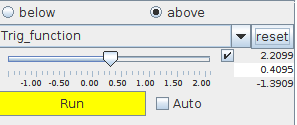
The threshold component drop down menu defines the input component for which an isovolume is generated. In case of vector data the length of the vector is used.
The threshold slider defines the isolevel value. If the checkbox on the right hand side of the slider is switched on, the user may adjust range and value entering the values in text input fields. For values below and above minimum and maximum value of the input data the lowest and highest value is used.
A radio button menu selects the extracted volume above or below the isosurface.
Each parameter change is processed dynamically if the Auto check box is switched on. If it is switched off processing is caused by pressing the Run button. The yellow button means that there are unprocessed parameter changes.
By default the Auto check box is switched off.
Presentation tab
Presentation tab contents are described in the common interfaces section under the Presentation Panel entry.
Example
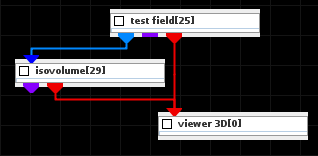
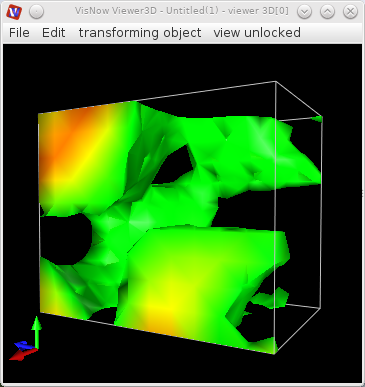
Choose the test field module from the test objects library and the isovolume module from 3D field mappers library and connect them. In the test field module choose 3D, in isovolume module choose an appropriate threshold value.