Module: Line Slice
Creates a slice of the input along a line
| input port | type | description | data acceptors |
|---|---|---|---|
| inField | VNRegularField | Regular Field 3D Regular Field 2D |
| output port | type | description | data schemas |
|---|---|---|---|
| outField | VNRegularField | ||
| outObj | VNGeometryObject |
Description
The line slice module extracts values along a line from a regular 2D or 3D field. The line is parallel to one of the index coordinates.
Input data
The input field is regular 2D or 3D.
Output data
The output is a 1D regular field. There is a geometry object of the field.
Computation parameters
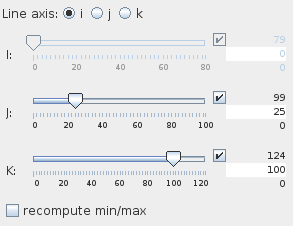
The Line axis radio button menu allows the user to choose the direction of the line. In case of a 2D input field the user chooses between i- and j-direction, in case of 3D input field the choice is between i-, j- and k-direction.
The sliders below the radio buttons pick up the placement of the line in the remaining directions. Text input fields on the right hand side of the sliders allows the user to type in the maximum, minimum and current values.
If recompute min/max is switched on, minimum and maximum values depend only on the values at the extracted line. By default this option is switched off.
Presentation parameters
Presentation tab contents are described in the common interfaces section unter the Presentation Panel entry.
Example
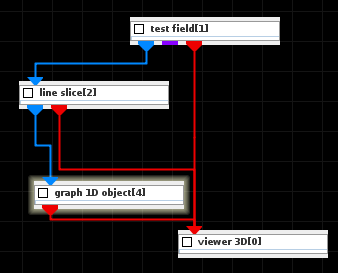
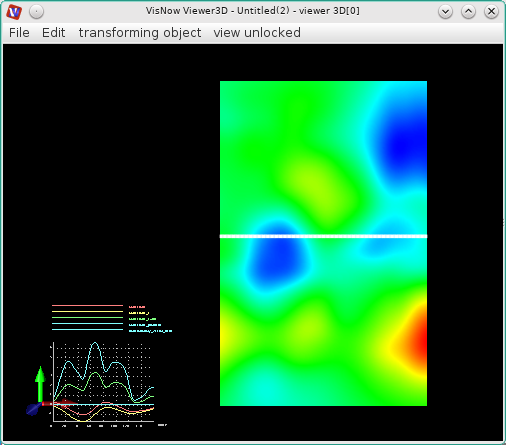
Choose test field module from test objects library, line slice module from 3D field mappers library and graph 1D object module from 1D field mappers and connect them. In the test field module choose 2D and some variables. Change the color of the line in the Presentation/Datamap by choosing mapping component null and white color. In graph 1D object choose all variables.