Module: Ribbon Plot
Creates a set of plots of slices of a regular 2D field as either ribbons or area type plots
| input port | type | description | data acceptors |
|---|---|---|---|
| inField | VNRegularField | Regular Field 2D |
| output port | type | description | data schemas |
|---|---|---|---|
| outBox | VNRegularField | Regular Field 3D |
|
| outObj | VNGeometryObject | complete animated geometry |
Description
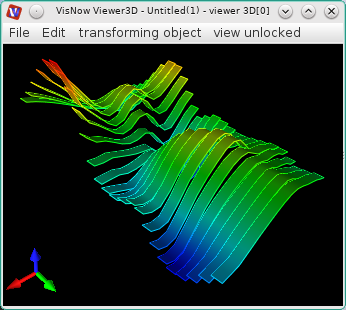
The ribbon plot module creates three dimensional graphs of scalar regular 2D fields in the form of narrow stripes or area slices.
Ribbons are continuous in one coordinate direction and discontinuous in the second direction.
Area slices are created in one of the coordinate directions.
Input data
The input field is regular 2D.
Output data
The output field is regular 3D. There is a geometry object of the field.
Computation parameters
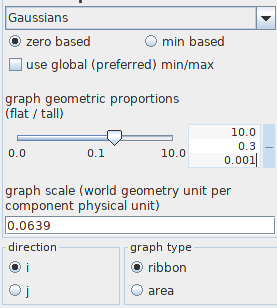
The graph component drop down list defines the data component which will be presented in the graph. By default the first component is used.
The user defines zero based or min based graphs. For zero based graphs are drawn beginning from value zero. For min based graphs are drawn beginning from the minimum value. By default the graph is zero based.
The option use global (preferred) min/max can be switched on if global minimum and maximum values should be used.
Both options graph geometric proportions and graph scale scale the height of the graph.
For the graph geometric proportions value 1 means that the height of the graph is near the size of the diameter of the field. The graph scale is the geometry unit per component physical unit. This means that when two graphs are connected to the same viewer 3D window, the right proportions of their height are preserved if the graph scale is of the same value.
The user defines the graph geometric proportions using either the slider or the text input fields for minimum, maximum and current value on the right hand side of the slider. The text input fields appear with mouse click at + on the right hand side of the slider, and disappear with mouse click at -.
The graph scale is defined by typing in a value to the text input field.
The direction radio button defines the direction in which ribbons or area slices will be drawn. By default the x-direction is used.
In the graph type menu the user defines the type of the graph as ribbons or area slices.
Presentation parameters
Presentation tab contents are described in the common interfaces section unter the Presentation Panel entry.
Example
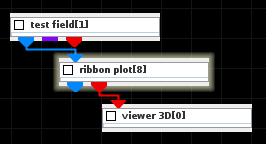
Choose a test field module from the test objects library and ribbon plot from 2D field mappers library and connect the modules.
In the test field module choose 2D and Gaussians, and resolution 20. In the ribbon plot module UI choose graph component Gaussians, direction x and graph scale 0.2.