Module: Interpolated Field Slice
Outputs a planar slice of any type of 3D field (regular or irregular) interpolated to a regular 2D field
| input port | type | description | data acceptors |
|---|---|---|---|
| inField | VNField | Regular Field 3D Irregular Field |
| output port | type | description | data schemas |
|---|---|---|---|
| outField | VNRegularField | Regular Field 2D |
|
| outObj | VNGeometryObject | Output of geometry object for 3D rendered volume |
Description
The interpolated field slice extracts any 2D slice plane from a 3D field.
Input data
The input field is 3D regular 3-space or irregular 3-space.
Output data
The output field is regular 2D 3-space with affine geometry. There is a 3D geometry object of the field.
Computation parameters
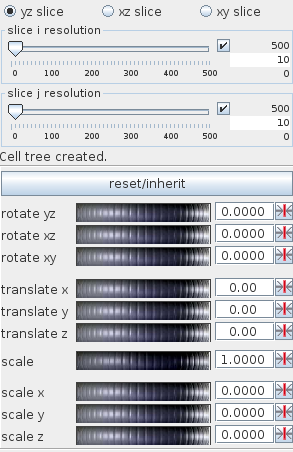
A radio button panel defines the slice orientation as yz slice, xz slice or xy slice.
Two sliders allow you to adjust the slice resolution in i- and j-direction.
The user may execute several slice transformations:
- rotations around the axes: x rot, y rot, z rot
- transformations in coordinate directions: x trans, y trans, z trans
- scaling of the whole slice plane: scale, or scaling in coordinate direction: x scale, y scale, z scale
Transformations are executed by typing values into the text input fields on the right hand sides of the wheels or scrolling the wheel with the left mouse button. Right mouse button click on the wheel reduces sensitivity of the wheel, left mouse button click increases sensitivity.
Clicking with the mouse on the buttons on the right hand side cancels this particular transformation.
Press the reset/inherit button to withdraw all transformations.
Presentation parameters
Presentation tab contents are described in the common interfaces section unter the Presentation Panel entry.
Example
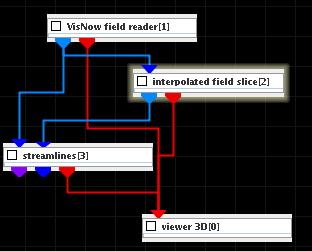
Choose VisNow field reader module from regular data readers library, interpolated field slice and streamlines modules from 3D field mappers library and connect them to viewer 3D.
Let the VisNow field reader module read in bluntfin.vnf. In the interpolated field slice module UI choose for both slice solutions 10. In its GUI choose lines instead of surface and change color mapping component null and white color. Change the position and the scale of the slice. In the streamlines module UI choose appropriate values for integration steps and step range.