Module: Time Select/animate
Selects a time moment from dtime dependent data, animates time dependent data over time.
| input port | type | description | data acceptors |
|---|---|---|---|
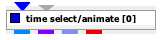
| inField | VNField | Input for data field with time frames | Field with time frames |
| timeMoment | Float |
| output port | type | description | data schemas |
|---|---|---|---|
| outRegularField | VNRegularField | Regular Field |
|
| outIrregularField | VNIrregularField | Irregular Field |
|
| outPointField | VNPointField | Point Field |
|
| outObj | VNGeometryObject | complete animated geometry |
Description
The module animates time dependent data over time.
Input data
The input field is a time dependent data field.
Output data
At output there is the field and a geometric object of the field.
Computation tab
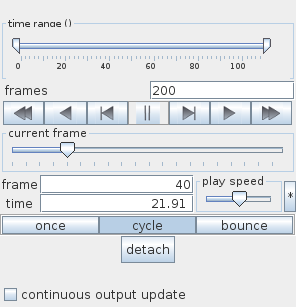
Using the time range slider the user defines the animated time interval. By default the whole interval of time steps is used.
The frames text field contains the number of time frames. By default the number equals the number of time steps. If the frame number is different from the number of time steps the values of the data are interpolated.
A set of buttons allows to navigate from frame to frame:
- reset: sets animation to the first frame,
- run back: displays sequence of frames backwards,
- step back: takes one step to the previous frame,
- pause,
- step: advances by one frame,
- run: displays forward, according to the run option mode,
- reset back: sets animation to the last frame.
The current frame slider and the frame and time text fields show the current frame and time step. The user can choose a frame number dragging the slider or entering a value into the frame text input field, or a time step entering a new value into the time text input field.
The play speed slider defines the animation speed. Mouse click on the button on the right hand side resets the speed.
There are three options for running an animation:
- once: animation is performed once
- cycle: animation is repeated
- bounce: animation is performed out and back
Press the detach button to detach/attach the navigation panel for the animation.
By default during animation only the geometry object is updated. In order to update output fields the continuous output update check box can be switched on.
Presentation tab
Presentation tab contents are described in the common interfaces section unter the Presentation Panel entry.
Example
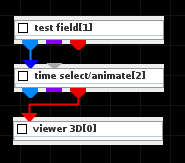
Choose the test field module from test objects library and time select/animate module from 3D field mappers library and connect them. In the test field module UI choose 2D and Time Vector Field. In the time select/animate module start animation.